

Choosing a 3PL WMS requires more than comparing feature lists. Most warehouse management systems can handle basic receiving, inventory, picking, packing, and shipping, but the differences become much clearer when you test how each platform deals with multiple clients, billing rules, warehouse exceptions, integrations, and changing operational requirements.
For a 3PL evaluating new software, the objective is not to find the platform with the longest list of capabilities. It is to find a 3PL warehouse management system that supports the way your operation actually works without creating new manual processes as clients, order volume, warehouse locations, and fulfillment requirements increase. A useful evaluation therefore starts with the problems your current system needs to solve and tests every shortlisted vendor against those same situations.
What Starts Breaking Without the Right 3PL WMS
A warehouse system that works well for one inventory owner can become difficult to manage once several clients share the same operation. Inventory ownership may become harder to trace, billing teams may rely on spreadsheets to reconcile warehouse activity, reports may take too long to prepare, and clients may depend on warehouse staff for information they should be able to access themselves.
The problems usually become more noticeable as the 3PL grows. New clients require more setup, integrations become harder to maintain, and peak order volume exposes weaknesses in picking, shipping, reporting, or billing workflows. These issues are useful evaluation inputs because they show exactly what a replacement platform needs to improve. If they are already affecting daily operations, document the broader warehouse management software limitations before beginning vendor discussions.
How to Test a 3PL WMS During a Demo

A WMS demo should show more than what happens when every order, shipment, and inventory record behaves exactly as expected. Real warehouses deal with discrepancies, order changes, failed integrations, inventory holds, damaged products, billing exceptions, and client-specific requirements, so those situations should be part of the evaluation.
Test Multi-Client Inventory Separation
Ask the vendor to receive the same SKU for two different clients and follow both inventory records through receiving, storage, allocation, picking, adjustments, and reporting. Then create an inventory discrepancy for one client and confirm that the correction remains isolated to that account.
This is more useful than simply asking whether the system supports multi-client inventory because it shows how ownership is maintained through real warehouse transactions. If stock accuracy is one of the reasons you are considering a new platform, test real-time inventory tracking at both the location and transaction level. The broader capabilities a multi-client operation may require are covered separately in our 3PL WMS features guide.
Test Receiving Exceptions and Putaway Rules
Do not limit the receiving demo to a clean inbound shipment. Give the vendor an ASN with a shortage, unexpected SKU, damaged inventory, or quantity mismatch and ask them to show how the discrepancy is recorded, how warehouse staff are expected to respond, and whether the issue remains visible until it is resolved.
The same test should continue into putaway. If your operation uses different storage rules by client, product, lot, expiry date, or warehouse zone, ask the vendor to demonstrate those conditions rather than simply showing standard directed putaway. The real question is whether the system can keep receiving moving when inbound inventory does not match the original plan.
Test Fulfillment Exceptions
Standard picking and packing rarely reveal the difficult parts of a warehouse system, so ask the vendor to process a normal order and then change something. Cancel an order after allocation, put inventory on hold, create a partial shipment, fail a shipping label, or remove stock from the expected picking location.
Watch how the system responds and how many steps warehouse staff need to take before the issue is resolved. If your clients use different fulfillment models, test DTC, B2B, wholesale, and any client-specific packing or labeling requirements separately so that one clean workflow is not assumed to represent the whole operation.
Test Client-Specific Billing
Billing deserves particular attention during a 3PL WMS evaluation because clients rarely use identical rate structures. One may be charged by pallet storage and order line, while another may have receiving fees, unit storage, packaging, value-added services, and different billing periods.
Give the vendor two realistic client agreements and ask the system to calculate charges from warehouse activity. This quickly shows whether billing is genuinely connected to operational transactions or whether your team will still need exports, spreadsheets, and manual adjustments before invoices can be prepared. If billing is already creating significant administrative work, review how 3PL billing automation should connect warehouse activity with client charges before comparing vendor approaches.
Test the Client Experience
A 3PL client portal should reduce routine communication between clients and warehouse staff, so evaluate it from the client's perspective rather than only through an administrator account. Ask for a client login and try to locate current inventory, an order, shipment tracking, inbound receipts, and reports without help from the salesperson.
If clients regularly create inbound shipments or submit ASNs themselves, test those workflows too. The portal does not need to expose every warehouse function, but routine information should be easy to access without forcing clients to contact the operations team for basic updates.
Test Whether Reports Answer Real Questions
Instead of asking whether the system includes reporting and analytics, give it questions your operation already needs to answer. Ask how much inventory a specific client currently holds, which orders missed today's shipping target, which inventory adjustments occurred during the week, or which warehouse activities contributed to a client's charges.
A reporting system may look comprehensive while still requiring several exports before an operational question can be answered. If teams need to rebuild the same information manually in spreadsheets, part of your current reporting workload may simply move into the new WMS.
Test Integration Failures, Not Just Successful Connections
A 3PL may need to exchange data with ecommerce platforms, marketplaces, ERP systems, accounting software, EDI networks, carriers, and client applications. Reviewing available WMS integrations is important, but the failure process deserves just as much attention.
Ask what warehouse staff see when an order does not import, inventory stops synchronizing, a carrier service becomes unavailable, or an API returns an error. A successful connection proves that data can move between systems, while error handling shows how much work your team will face when something goes wrong.
What Criteria Should You Use to Evaluate a 3PL WMS?
Once demonstrations begin, every vendor will present features and workflows differently, which makes a common evaluation framework important. The criteria should reflect your operation rather than giving equal weight to every capability a salesperson happens to demonstrate.
Operational fit should come first. The platform needs to handle your difficult receiving, fulfillment, billing, returns, reporting, and exception workflows without relying on repeated processes outside the WMS.
Client scalability matters because a system that works for ten accounts may become difficult to administer at twenty-five. Ask what needs to be configured when a new client is added, including billing, users, integrations, inventory rules, shipping requirements, workflows, and reports.
Exception handling should also carry significant weight. Most systems handle standard transactions well, but shortages, order changes, damaged receipts, failed integrations, incorrect labels, and billing discrepancies reveal how usable the platform is during actual warehouse operations.
Implementation effort affects both timeline and risk. Data migration, client configuration, integrations, testing, training, and go-live support should have clearly defined owners and dependencies before a project begins.
Integration reliability should be evaluated beyond the number of available connections. Confirm who maintains each integration, how failures are surfaced, and what your operations team is expected to do when connected systems change or stop responding.
Commercial fit means understanding what happens to cost as the business grows. Model future clients, users, warehouses, transactions, and order volume rather than comparing only today's subscription fee.
Finally, review vendor support in practical terms. Understand available support channels, service hours, escalation procedures, expected response times, and whether stronger support levels require additional fees.
7 Red Flags When Evaluating a 3PL WMS Vendor
A prepared demonstration can make almost any platform look organized. The warning signs usually appear when vendors are asked to work with real warehouse processes, client requirements, and commercial details.
Red Flag 1: The Demo Never Uses Your Workflow
Sample data makes software demonstrations easier, but it can also hide important operational requirements. Give every shortlisted vendor at least one workflow from your own warehouse and ask them to demonstrate it from beginning to end.
Receiving, billing, fulfillment exceptions, and client reporting are especially useful because they often expose configuration requirements that a standard product tour does not.
Red Flag 2: Multi-Client Billing Depends on Workarounds
If charges need to be exported, rebuilt in spreadsheets, or manually reconciled before invoicing, your billing team may continue doing much of the same administrative work after implementation. Ask exactly where each charge originates and how warehouse activity becomes a billable client transaction.
The answer should make it clear whether billing is part of the operational workflow or something assembled afterward.
Red Flag 3: The Client Portal Is Difficult to Use
Evaluate the portal from the client's perspective rather than relying on screenshots or administrator views. Check whether a client can easily locate inventory, orders, tracking information, inbound shipments, and reports.
If basic information regularly requires help from warehouse staff, the portal may not reduce client-service workload as much as expected.
Red Flag 4: The Implementation Timeline Has No Scope Behind It
A timeline such as "four to six weeks" is difficult to evaluate unless the work behind it is clearly defined. Request a written implementation plan covering data migration, warehouse configuration, client setup, integrations, testing, training, responsibilities, and go-live support.
The important question is not simply when implementation can finish. It is whether everything required before that date has actually been identified.
Red Flag 5: Pricing Becomes Unpredictable as You Grow
A 3PL WMS may be priced by users, warehouses, clients, transactions, orders, labels, API usage, modules, or some combination of them. A reasonable starting cost can therefore look very different after the operation grows.
Model the business twelve to twenty-four months ahead by adding expected clients, users, order volume, or another warehouse, then ask each vendor to recalculate the cost under those conditions.
Red Flag 6: There Is No Reference From a Similar Operation
Ask to speak with a customer whose warehouse resembles yours in size, client mix, fulfillment model, integrations, or operational complexity. A reference from a very different type of business may not tell you much about how the platform performs in your environment.
Instead of simply asking whether the customer likes the software, ask what took longer than expected, which workflows required additional configuration, what caused problems after launch, and how the vendor responded.
Red Flag 7: Contract and Exit Terms Are Unclear
Before signing, understand the contract length, renewal conditions, annual pricing changes, termination terms, data export options, migration support, and support commitments. These details can become important long after implementation is complete.
Changing warehouse systems is already difficult enough without discovering that retrieving your own operational data has somehow become an archaeological expedition.
Include Total Cost in Your WMS Evaluation
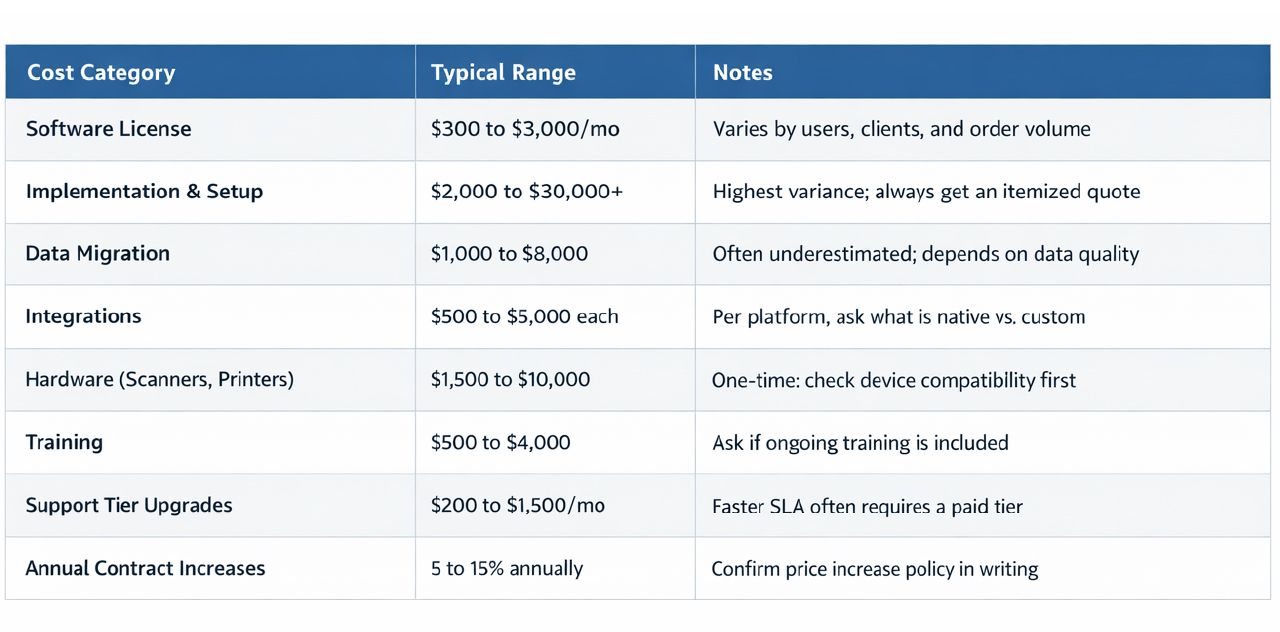
The software subscription is only one part of changing a warehouse management system. Implementation, data migration, integrations, scanners, printers, training, support, additional warehouse locations, custom requirements, and transaction-based charges can all affect the total investment.
Ask every vendor to model costs using the same assumptions and compare today's operation with the client count, warehouse footprint, users, and order volume you expect over the next year or two. The 3PL software pricing guide covers common pricing structures in more detail, while our WMS cost guide explains broader implementation and ownership costs.
How to Score 3PL WMS Vendors Before Making a Decision

Once the shortlist is small, score each vendor against the same requirements. The scoring method does not need to be complicated, but it should prevent less important features from distracting the team from the problems the new system is supposed to solve.
Step 1: Identify Your Top Three Operational Problems
Start with the issues creating the most cost, risk, or administrative work today, such as billing hours, inventory discrepancies, picking errors, integration failures, reporting workload, client visibility, or slow onboarding.
These problems should receive the most attention during demos and should carry more weight in the final evaluation than secondary capabilities with little operational impact.
Step 2: Create a Weighted Scorecard
Not every requirement deserves equal weight. If billing is creating significant manual work, billing should contribute more to the final score than a feature the operation rarely uses.
Assign greater weight to requirements with the largest operational impact and use the same weighting for every vendor so that the final comparison reflects business priorities rather than presentation quality.
Step 3: Run the Same Scenarios With Every Vendor
Ask each platform to handle the same warehouse situations, including your most complicated receiving workflow, a difficult client billing arrangement, at least one fulfillment exception, an integration failure, and a common client reporting request.
Document which processes work natively and which require configuration, manual steps, custom development, or another system. Using the same scenarios makes differences between vendors much easier to identify.
Step 4: Contact Comparable Customer References
Speak with customer references before making the final selection and focus on operations that resemble yours as closely as possible.
Ask about implementation, support responsiveness, unexpected configuration work, integration issues, billing setup, and whether the system continued fitting the operation as the business grew. A comparable reference can reveal problems that rarely appear during a sales process.
Step 5: Review Commercial Terms Before Signing
Implementation fees, support agreements, usage limits, contract terms, future pricing, data access, and renewal conditions should be part of the selection process rather than paperwork reviewed after the platform has effectively been chosen.
Once your requirements and scoring model are defined, compare the best WMS platforms for 3PL operations using the same workflows and evaluation criteria.
Final Takeaway
Choosing a 3PL WMS becomes easier when every vendor is evaluated against the same warehouse workflows, exceptions, billing rules, integration requirements, and growth assumptions. A standard demonstration can show what the software is capable of, but your own receiving, billing, fulfillment, reporting, and exception scenarios reveal whether it actually fits the operation.
If Fulfillor is on your shortlist, schedule a live walkthrough and use the same operational scenarios you plan to test with other vendors.
Frequently Asked Questions
How Do I Choose the Right 3PL WMS for My Warehouse?
Start by documenting the operational problems the new WMS needs to solve, then evaluate every vendor using the same receiving, inventory, billing, fulfillment, integration, reporting, and exception scenarios. The final decision should be based on how well each platform handles your actual operation rather than the number of features shown during a standard demo.
What Should I Ask During a 3PL WMS Demo?
Ask the vendor to demonstrate real workflows using situations from your operation, such as receiving the same SKU for two clients, resolving an inventory discrepancy, calculating different billing rules, processing a fulfillment exception, handling a failed integration, and finding information through the client portal. Exception handling often reveals more about a WMS than a normal order moving successfully through the system.
How Should I Compare 3PL WMS Vendors?
Use the same evaluation criteria, warehouse scenarios, growth assumptions, and scoring model for every vendor. Prioritize the requirements with the greatest operational impact and document where each platform requires additional configuration, integrations, manual work, or custom development so that the final comparison reflects real operating fit rather than feature counts alone.